Docs for AI agents
Form a Wyoming LLC from Cursor, Claude, ChatGPT, and other MCP clients.
GatewayBase has a Model Context Protocol (MCP) server. Your AI assistant can collect company details, verify email, and create a Stripe payment link. You still pay in the browser. Filing stays in GatewayBase.
What MCP is
A standard way for AI apps to form a US company.
MCP is an open protocol from Anthropic that many AI tools now share. Instead of each assistant inventing its own API, it calls named tools. GatewayBase publishes Wyoming LLC formation tools at https://gatewaybase.app/api/mcp.
This is useful if you want to form a company from chat, build an agent that onboards founders, or let operations staff file without opening the website first. The assistant talks to GatewayBase. GatewayBase talks to Stripe and Wyoming filing.
Formation today is $199. That covers Wyoming LLC filing and registered agent service for year 1. Payment happens on Stripe Checkout, not in the chat transcript.
Connect
Add GatewayBase to your AI app.
Click the install button for your app, or paste the snippet. After you add the server, the app should ask you to sign in. Sign in or create a GatewayBase account, then allow the assistant. Opening the connect helper page in a normal browser tab does not finish login by itself.
Click Install in Cursor to open Cursor and add GatewayBase. To set it up yourself, add this to ~/.cursor/mcp.json.
json
{
  "mcpServers": {
    "gatewaybase": {
      "url": "https://gatewaybase.app/api/mcp"
    }
  }
}
After you add the server, click Authenticate. Cursor opens GatewayBase so you can sign in and allow the assistant. See Cursor MCP docs.
How to use it
Ask the assistant to form the company, then pay the Stripe link.
- Tell the assistant the company name, owner name, email, phone, and address.
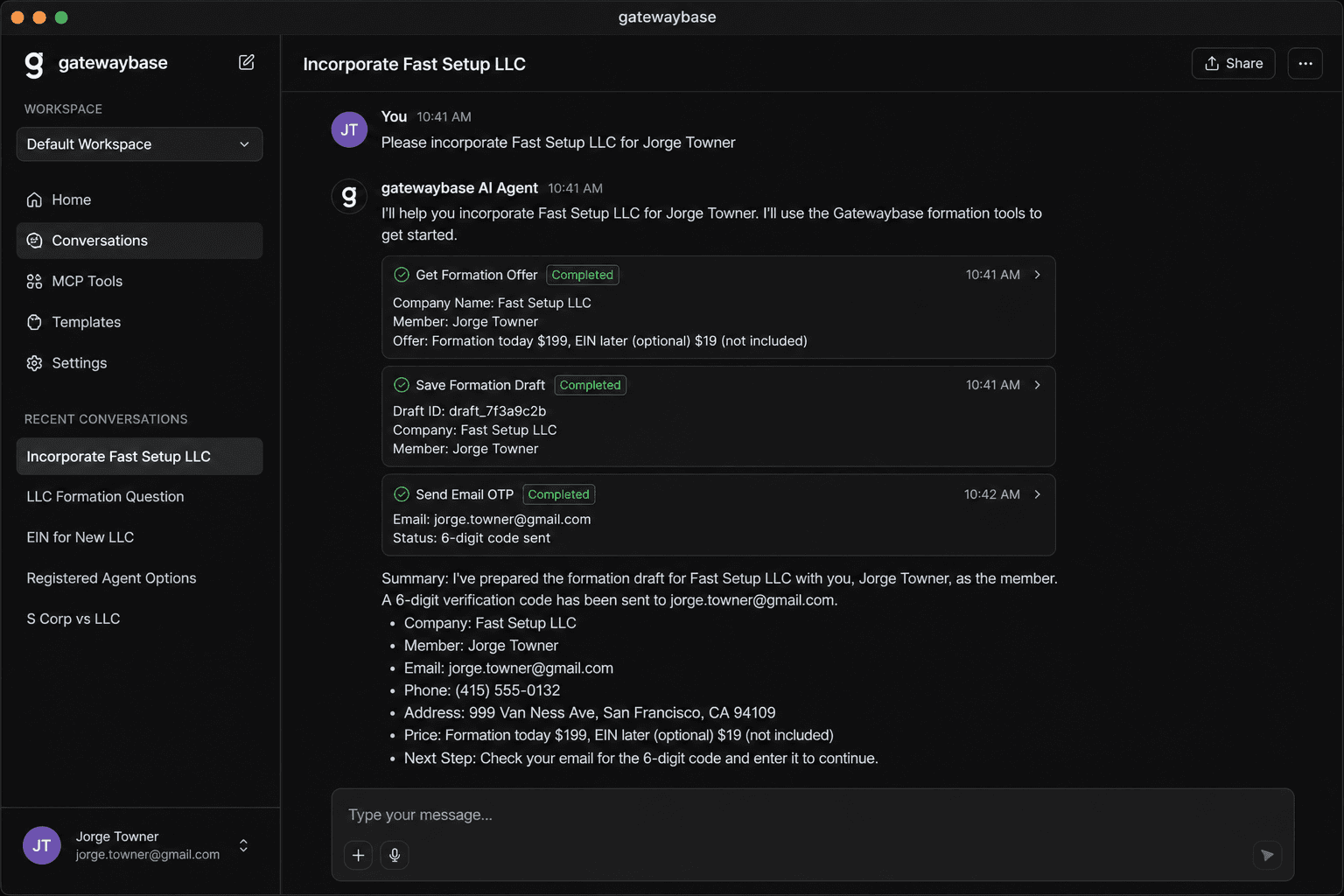
- The assistant calls
get_formation_offer, thensave_formation_draft. - Confirm the email. A 6-digit code arrives. Paste it in chat so the assistant can call
verify_email_otp. - Open the Stripe link from
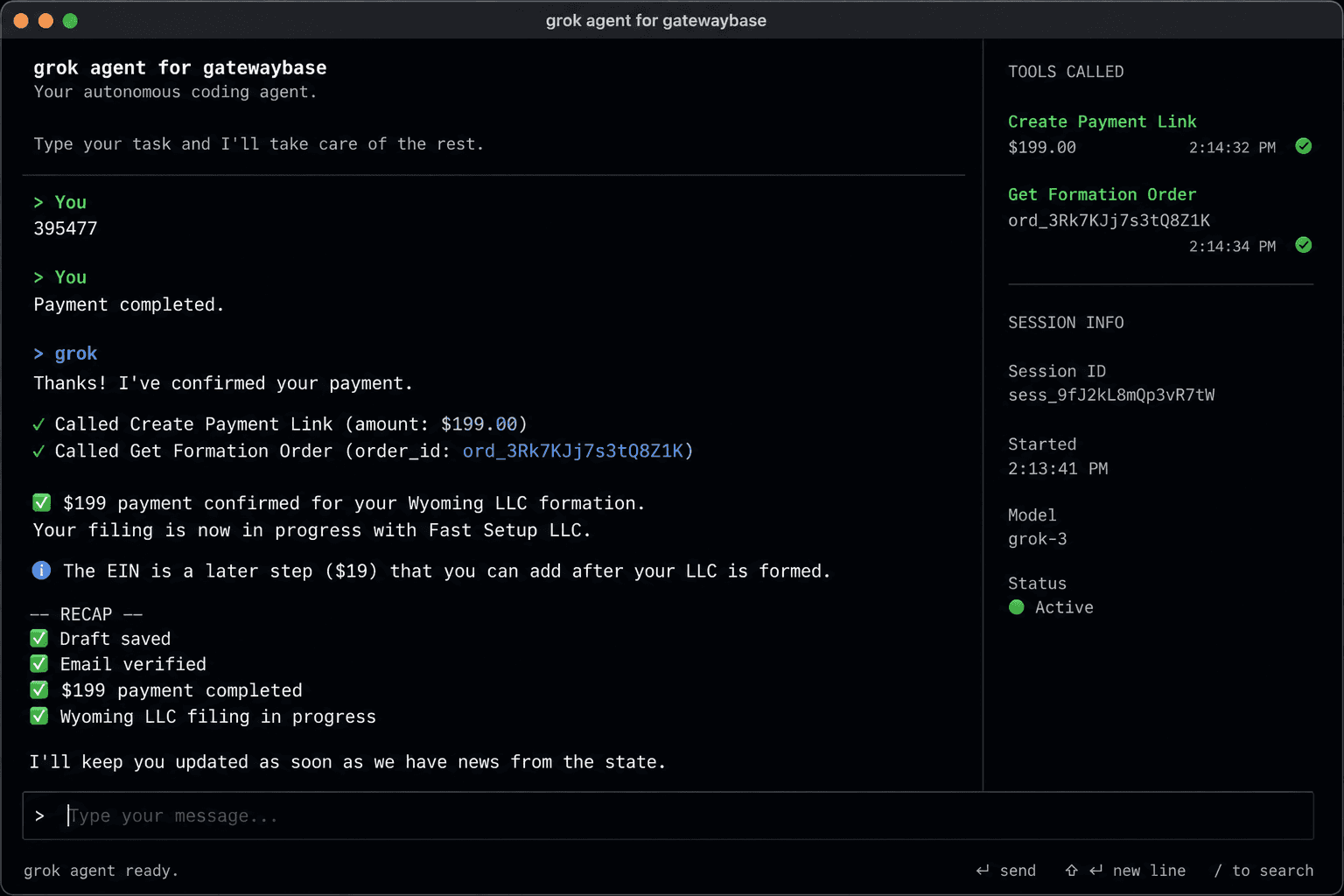
create_payment_linkand pay $199. - Tell the assistant you paid. It checks
get_formation_orderand GatewayBase starts Wyoming filing.
Example prompt: “Form a Wyoming LLC named Fast Setup LLC. The member is Jorge Towner. Use my email and San Francisco address.”
In an AI client
A real formation from chat.
These captures show an MCP-enabled assistant saving a Wyoming LLC draft, sending an email code, creating a $199 payment link, and confirming that filing has started.
Tools
Formation tools on the MCP server.
| Tool | What it does |
|---|---|
| get_formation_offer | Show required fields and the formation price. Call this first. |
| save_formation_draft | Save the company name, owner, email, phone, and address. Returns an order id. Does not charge. |
| send_email_otp | Email a 6-digit code to the contact on the draft. |
| verify_email_otp | Check the code, then create or sign in the GatewayBase account. |
| create_payment_link | Create a Stripe Checkout URL for formation only. |
| get_formation_order | Check payment and filing status after checkout. |
| get_formation_documents | Get time-limited download links after the LLC is formed. |
After the LLC exists, the same server can start a later tax-ID filing. Those tools fail until formation is complete. They are not part of the $199 checkout.
| Later tool | What it does |
|---|---|
| get_ein_offer | Show the later tax-ID step and price after the LLC exists. |
| start_ein_application | Start that later filing for a formed company only. |
| save_ein_draft | Save remaining business-activity answers. |
| create_ein_signature_link | Send a weblink so the owner can review and sign. |
| create_ein_payment_link | Create Stripe Checkout after the form is signed. |
| get_ein_application | Check status and download links when ready. |
Build with it
Implement MCP in your own agent or workflow.
If you are writing an agent, use an MCP client SDK and connect over Streamable HTTP. Discover tools with tools/list, then call them in the order above. Keep OAuth tokens on the client. Never log card data.
typescript
import { Client } from "@modelcontextprotocol/sdk/client/index.js"

// Connect with your MCP client's Streamable HTTP transport
// to https://gatewaybase.app/api/mcp after the user finishes OAuth.

const offer = await client.callTool({ name: "get_formation_offer", arguments: {} })
const draft = await client.callTool({
  name: "save_formation_draft",
  arguments: {
    businessName: "Fast Setup",
    memberFirstName: "Jorge",
    memberLastName: "Towner",
    contactEmail: "[email protected]",
    memberPhone: "+14155550100",
    memberAddressLine1: "999 Van Ness Ave",
    memberCity: "San Francisco",
    memberPostalCode: "94109",
    memberCountry: "US",
  },
})
Public website formation is still available at Start a Wyoming LLC. MCP is the same product, started from an assistant.
FAQ